
Quantum Wi-Fi App
Quantinium - Miami, US
Designing a mobile-first Wi-Fi connectivity experience focused on simplicity, control, and real-time management.
ROLE
Senior Product Designer
TEAM
1 Designer - 3 Engineers
SCOPE
End-to-End, Product Design, UX, UI, AI Prototyping
SYSTEM
iOS & Android
Context
Quantinium manages Wi-Fi networks in residential and commercial buildings in Florida.
Tenants connect to the internet through the building infrastructure, no personal router, and can also access Quantum Wi-Fi hotspots outside the building.
2
Network types
Public free Wi-Fi
Paid residential internet plans
3
User types
Residential tenants
Occasional visitors
Building administrators
0
Existing App or Webapp
No app or webapp existed before this project
Impact
The project delivered a complete ecosystem
By simplifying onboarding, reducing interaction steps, and unifying multiple connectivity experiences, the app transformed a fragmented process into a clear and intuitive product journey.
↓ Eliminated repeated manual logins across networks
↑ Real-time connection status & network visibility
+ Self-serve plan management (previously support-only)
Problem
Users move across different areas of the building and have to connect to different Wi-Fi networks each time, with repeated manual authentication. They don't know which network they're connected to, have no visibility on connection status, and can't manage their internet plan from mobile.
Repeated Authentication
There was no way to know which network you were connected to, signal quality, or whether the connection was active.
No Self Plan Management
How I Solved It
I led the end-to-end design of Quantum Wi-Fi, from early concepts to launch.
I defined the overall product experience, mapped core user flows, and built the complete UI system across the apps. My work covered product strategy, UX, interaction design, prototyping, and visual execution.
1
Discovery
Interviews with users and the technical team. Analysis of pain points in the existing connection process.
Learn More
2
User Flows
Mapped the core user journeys: connection, plan management, and hotspot discovery. Turning complex network logic into clear, frictionless flows.
3
Architecture
Definition of the information architecture and interaction patterns for both network types.
Learn More
4
UI System
Design of the complete visual system, components, states, dark/light mode, consistent with the Quantum Wi-Fi brand.
AI-Assisted Workflow
I used Claude Code and Figma Make to prototype ideas fast, testing flows and UI directions before committing to the final screens.
Learn More
Final Design
Designed to deliver a frictionless connectivity experience, the app takes users from onboarding to instant connection, automatically recognizing and joining nearby Quantum Wi-Fi networks without repeated logins.
Users can manage their subscription, adjust their plan directly in-app, and explore the wider Quantum hotspot network to stay connected beyond their primary location.
The following mockups showcase the feature:
Connection:
Onboarding
Enable Location
Network Connection
Plan & Coverage:
Internet Plan Selection
Plan Management
US Hotspot Map
Connection

ONBOARDING
No new account
Tenants log in with the UISP credentials they already have - zero setup.

ENABLE LOCATION
Permission with a reason
Location is requested only with a clear why, so users grant it willingly.

NETWORK CONNECTION
One tap, no re-login
Distance and status at a glance - connect in a single tap, no credentials each time.
Plan & Coverage

INTERNET PLAN SELECTION
Self-serve plans
Compare and activate plans in-app no support call, no web portal.

PLAN MANAGEMENT
Instant confirmation
Right after upgrading, users see their new plan, speed, and price - already active.

US HOTSPOT MAP
Coverage that follows you
Find Quantum hotspots even
outside the building.
Self-serve plan Flow
Compare, upgrade, and pay for a plan in a few steps - it activates instantly, with no support call or web portal.

WI-FI PLAN SELECTION
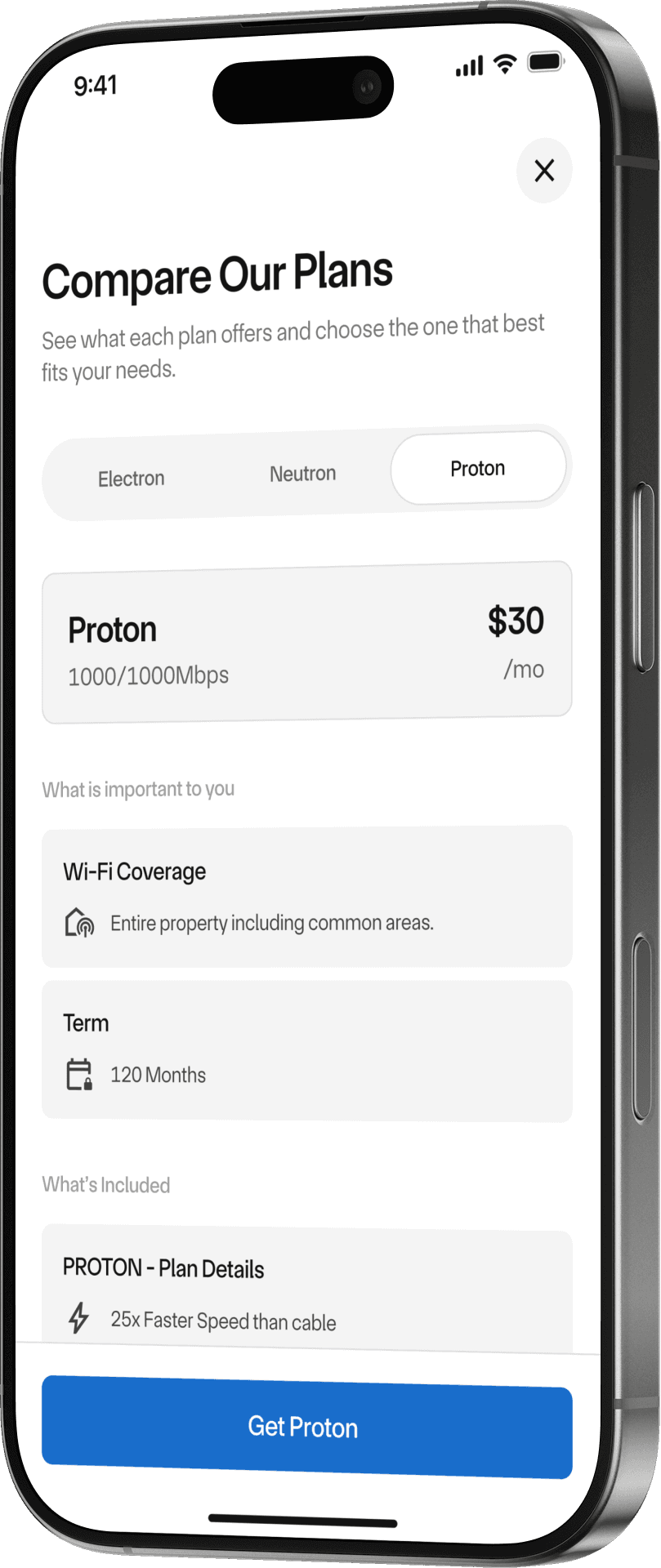
COMPARE PLANS AVAILABLE

CHOOSE YOUR NEW PLAN
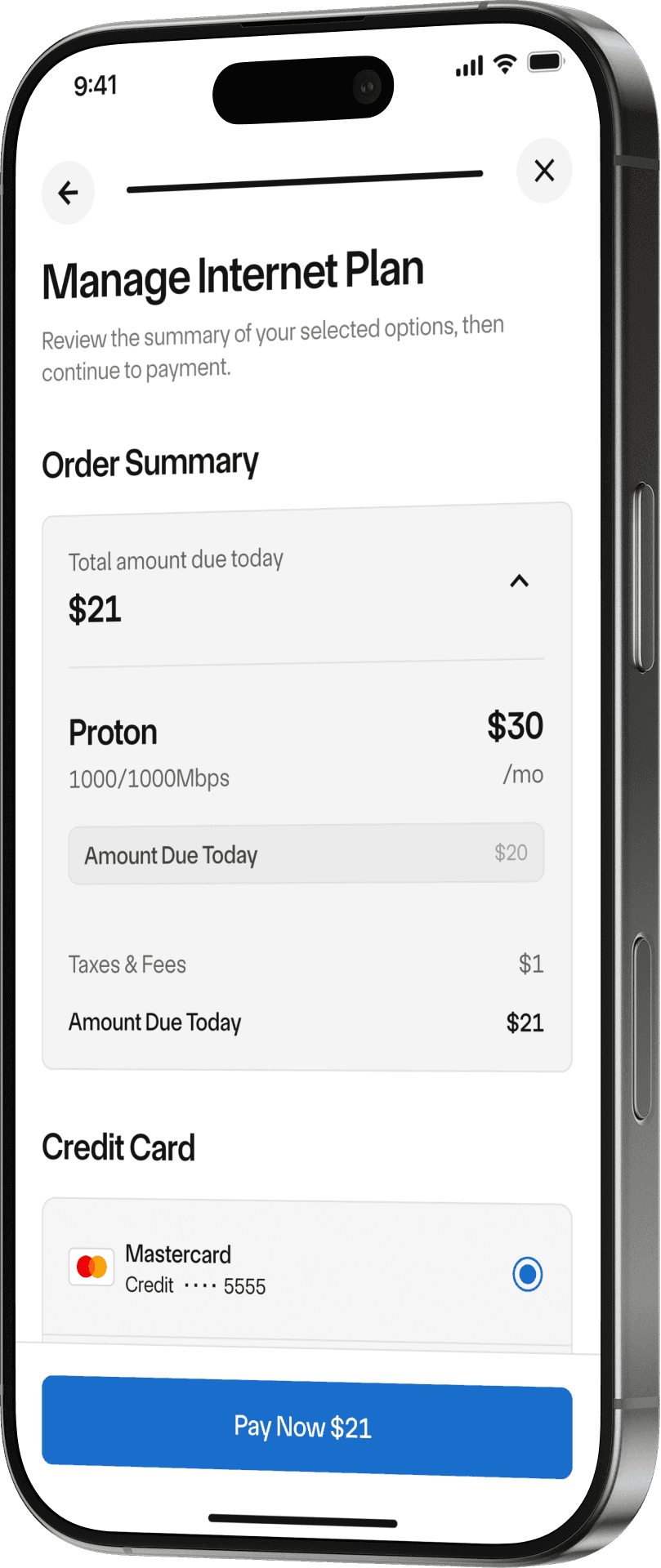
PAY DIRECTLY IN APP

DONE, YOUR PLAN IS UPDATED
Prototype
Seamless Connectivity
An interactive prototype that simulates the real connection experience - finding nearby hotspots on the map, connecting in a single tap, and watching the status update in real time.
What the prototype validated:
One-tap connection with no repeated login
Real-time feedback: status, signal, distance. So "automatic" never feels uncertain
Hotspot discovery beyond the user's own building
Building it interactively, not just as static screens, was how I tested whether "seamless" actually felt effortless in the hand, not only on paper.
Reflections
1
Designing the flow meant removing a support cost, not adding a feature.
Plan activation, upgrade, and payment used to run through customer support. Moving them in-app wasn't a screen to design - it was an entire category of friction to eliminate.
2
Invisible only works if it feels trustworthy.
Auto-connecting means users lose the manual cues that told them it worked. That's why connection status, signal, and distance are surfaced at a glance - without visible proof, "seamless" reads as "broken."
3
A permission has to be earned, not just requested.
Location is essential to find nearby hotspots, but asking cold erodes trust. Showing why before the system prompt turned a likely drop-off into an accepted step.